
Benefits of Pulumi

Real Code
Pulumi is infrastructure as real code. This means you get all the benefits of your favorite language and tool for provisioning cloud infrastructure: code completion, error checking, versioning, IDE support, and general productivity gains — without the need to manage YAML and DSL syntax.

Reusable Components
As Pulumi is code, you can build up a library of packages to further enhance efficiency. Build repeatable practices through versioned packages such as: standard policies, network best practices, architecture blueprints — and deploy them to your team.

Immutable Infrastructure
Pulumi provides the computation of necessary cloud resources with a 'Cloud Resource DAG' ensuring successful deployment of cloud infrastructure — efficiently building, updating, and destroying cloud resources as required.
Creating a Serverless REST API
With Pulumi, you can combine infrastructure definitions and application code in one program. The Crosswalk for AWS Infrastructure Library is a set of Pulumi components that provide a higher-level abstraction over AWS. So, instead of provisioning an API Gateway instance, Lambda functions, and setting up IAM roles, you can use this library and define application code at the same time as the infrastructure it depends on.
This example shows how to create a simple REST API that counts the number of times a route has been hit. To implement this API, we need a DynamoDB table, an API endpoint, and a Lambda function.
import * as aws from "@pulumi/aws";
import * as awsx from "@pulumi/awsx";

// Create a mapping from 'route' to a count.
let counterTable = new aws.dynamodb.Table("counterTable", {
    attributes: [{ name: "id", type: "S" }],
    hashKey: "id",
    readCapacity: 5,
    writeCapacity: 5,
});

// Create an API endpoint.
let endpoint = new awsx.apigateway.API("hello-world", {
    routes: [{
        path: "/{route+}",
        method: "GET",
        eventHandler: (req, res) => {
            let route = event.pathParameters!["route"];
            let client = new aws.sdk.DynamoDB.DocumentClient();

            // Get previous value and increment our table entry.
            let tableData = await client.get({
                TableName: counterTable.name.get(),
                Key: { id: route },
                ConsistentRead: true,
            }).promise();

            let value = tableData.Item;
            let count = (value && value.count) || 0;
            await client.put({
                TableName: counterTable.name.get(),
                Item: { id: route, count: ++count },
            }).promise();

            return {
                statusCode: 200,
                body: JSON.stringify({ route, count }),
            };
        },
    }],
});

exports.endpoint = endpoint.url;
Build and deploy containers to AWS
Pulumi supports programming against container orchestrators – Amazon’s ECS, EKS, and AWS Fargate. Pulumi is entirely unopinionated about how containers are built, published, and deployed to your orchestrator.
This code builds and deploys a custom Dockerfile to a private ECR repository, and spin up a load balanced ECS service listening on port 80. By default, this will run in Fargate when targeting AWS, which means you can skip the complications of configuring an orchestrator. After running pulumi up, the auto-assigned URL will be printed.
import * as awsx from "@pulumi/awsx";

const cluster = new awsx.ecs.Cluster("cluster");

const alb = new awsx.elasticloadbalancingv2.ApplicationLoadBalancer(
    "net-lb", { external: true, securityGroups: cluster.securityGroups });
const web = alb.createListener("web", { port: 80, external: true });

const img = awsx.ecs.Image.fromPath("app-img", "./app");

const appService = new awsx.ecs.FargateService("app-svc", {
    cluster,
    taskDefinitionArgs: {
        container: {
            image: img,
            cpu: 102 /*10% of 1024*/,
            memory: 50 /*MB*/,
            portMappings: [ web ],
        },
    },
    desiredCount: 5,
});

export const url = web.endpoint.hostname;
Build and deploy Kubernetes apps to AWS EKS
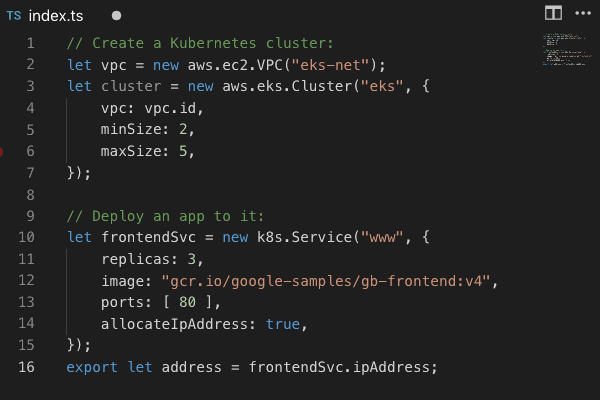
Pulumi supports programming against Kubernetes – Minikube, custom on-premises, or cloud-hosted custom clusters or in managed clusters such as Amazon EKS.
This code runs a simple Kubernetes deployment using the Guestbook sample application composed of Redis and a web frontent onto Kubernetes. Pulumi supports sophisticated use cases such as advanced deployment scenarios, sidecar patterns, etc.
// Deploy a simple app to Kubernetes.

import * as k8sjs from "./k8sjs";

let redisMaster = new k8sjs.ServiceDeployment("redis-master", {
    image: "k8s.gcr.io/redis:e2e",
    ports: [ 6379 ]
});

let redisSlave = new k8sjs.ServiceDeployment("redis-slave", {
    image: "gcr.io/google_samples/gb-redisslave:v1",
    ports: [ 6379 ]
});

let frontend = new k8sjs.ServiceDeployment("frontend", {
    replicas: 3,
    image: "gcr.io/google-samples/gb-frontend:v4",
    ports: [ 80 ],
    loadBalancer: true,
});

export let frontendIp = frontend.ipAddress;
Creating a Simple Web Server
Pulumi gives you a way to express AWS infrastructure configuration using your favorite programming language.
This code uses TypeScript on Node.js to define the necessary security group, and defines a very simple web server, and then creates the instance, before exporting the IP and Hostname.
const aws = require("@pulumi/aws");

let size = "t2.micro";
let ami  = "ami-7172b611"

// Create a new security group for port 80.
let group = new aws.ec2.SecurityGroup("web-secgrp", {
    ingress: [
        { protocol: "tcp", fromPort: 22,
          toPort: 22, cidrBlocks: ["0.0.0.0/0"] },
        { protocol: "tcp", fromPort: 80,
          toPort: 80, cidrBlocks: ["0.0.0.0/0"] },
    ],
});

// Create a simple web server.
let userData =
    "#!/bin/bash \n" +
    "echo 'Hello, World!' > index.html \n" +
    "nohup python -m SimpleHTTPServer 80 &";

let server = new aws.ec2.Instance("web-server-www", {
    tags: { "Name": "web-server-www" },
    instanceType: size,
    securityGroups: [ group.name ],
    ami: ami,
    userData: userData
});

exports.publicIp = server.publicIp;
exports.publicHostName = server.publicDns;
How Pulumi Works
1Create
- Code in real languages
- Share and reuse patterns
- Use your favorite IDE and tools
2Deploy
- Preview changes
- Run
pulumi upto deploy - Integrate with CI/CD
3Manage
- Audit all changes
- Manage complex environments
- Implement policies and controls


Featured Customer
Learning Machine
Learning Machine, a blockchain SaaS company faced two challenges with their cloud infrastructure:
- Skills gaps between Dev and DevOps creating silos, and fragility.
- The need to more rapidly provision their expanding roster of new customers.
By moving to Pulumi, Learning Machine were able to solve both challenges with significant increases in capability:
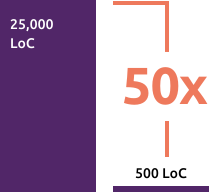
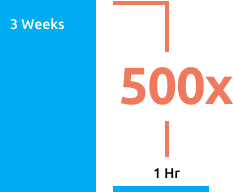
Pulumi has given our team the tools and framework to achieve a unified development and DevOps model, boosting productivity and taking our business to any cloud environment that our customers need. We retired 25,000 lines of complex code that few team members understood and replaced it with 100s of lines in a real programming language.
— Kim Hamilton, CTO Learning Machine
Get Started with Pulumi
Use Pulumi's open source SDK to create, deploy, and manage infrastructure on any cloud.




Learn how top engineering teams are using Pulumi's SDK to create, deploy, and manage AWS resources.
We are building a distributed-database-as-a-service product that runs on Kubernetes clusters across multiple public clouds including GCP, AWS and others. Pulumi's declarative model, the support for real programming languages, and the uniform workflow on any cloud make our SRE team much more efficient.