Node.js (JavaScript, TypeScript)
Pulumi supports JavaScript programs running on Node.js using any of the Current, Active and Maintenance LTS versions.
Because programs are just JavaScript, you may elect to write them in any manner you’d normally write Node.js programs. That includes TypeScript, CoffeeScript, or Babel, in addition to your favorite tools such as build systems, linters, or test frameworks.
Getting Started
The fastest way to get started in JavaScript is using a template. From an empty directory in which you’d like to create a new project:
$ mkdir myproject && cd myproject
$ pulumi new javascript
This will create a Pulumi.yaml project file, a package.json file for dependencies, and an index.js file, containing your program. The name of the directory is used as the project name in Pulumi.yaml.
Entrypoint
Pulumi executes your program by loading the entrypoint file as a Node module: require("index.ts"). By default, Pulumi will load index.ts or index.js. Alternatively, if you specify main within your package.json, Pulumi will load that module instead:
{
    "name": "my-package",
    "version": "1.0.0",
    ...
    "main": "src/entry.ts"
}
Your entrypoint can either return a module object with properties for each stack output:
// create resources
...
exports.out = myResource.output;
// create resources
...
export const out = myResource.output;
Or alternatively, your entrypoint can export a top level async function that returns an object with members for each stack output.
Pulumi will automatically call this function and await the result:
module.exports = async () => {
    // create resources
    return { out: myResource.output };
}
export = async () => {
    // create resources
    return { out: myResource.output };
}
Most Pulumi programs use the first option, but programs that need to do async work at the top level (such as calling getOutputValue) may find they want to use the second.
TypeScript
You can elect to write Pulumi programs in TypeScript to get additional verification and tooling benefits. As of version 0.15.0, Pulumi supports TypeScript natively so you don’t need to explicitly run tsc on your program before running pulumi
If you would like full control of the TypeScript build process, you can compile ahead of time, and point your package.json main entry point at the compiled JavaScript instead. If you do this, you can disable the automatic compilation of TypeScript files.
The fastest way to get started with Pulumi in TypeScript, is to use a template:
$ mkdir myproject && cd myproject
$ pulumi new typescript
This will auto-generate all the basic artifacts required to use TypeScript. If you prefer, you can instead run the following manual steps.
1. Update package.json
Update your package.json to look like the following (with your own values for name, version, etc.). This
is what tells Node.js and NPM what packages you depend on, where to find your code’s entry points, and so on:
{
    "name": "my-package",
    "version": "1.0.0",
    "devDependencies": {
        "@types/node": "^10.0.0"
    },
    "dependencies": {
        ... as before ...
    }
}
You can customize this however you’d like, such as adding test scripts, npm package dependencies, etc. For more information on package.json, please refer to the NPM documentation.
2. Install dependencies
Run npm install or yarn install to install the new development-time dependencies to your node_modules directory.
3. Create tsconfig.json
When using Pulumi’s built in TypeScript support, a tsconfig.json file is optional. However, defining one allows your to set additional TypeScript compiler options, for example not allowing implicit returns from a function. In addition, other tools like VS Code will use these settings to give you additional warnings at development time. Any options set in your tsconfig.json file will be picked up by Pulumi. We recommend creating a tsconfig.json file with the following settings:
{
    "compilerOptions": {
        "outDir": "bin",
        "target": "es6",
        "lib": [
            "es6"
        ],
        "module": "commonjs",
        "moduleResolution": "node",
        "declaration": true,
        "sourceMap": true,
        "stripInternal": true,
        "experimentalDecorators": true,
        "pretty": true,
        "noFallthroughCasesInSwitch": true,
        "noImplicitAny": true,
        "noImplicitReturns": true,
        "forceConsistentCasingInFileNames": true,
        "strictNullChecks": true
    },
    "files": [
        "index.ts"
    ]
}
You may customize this however you’d like, including the TypeScript settings that work for you. For
information on additional settings, see the TypeScript documentation for tsconfig.json.
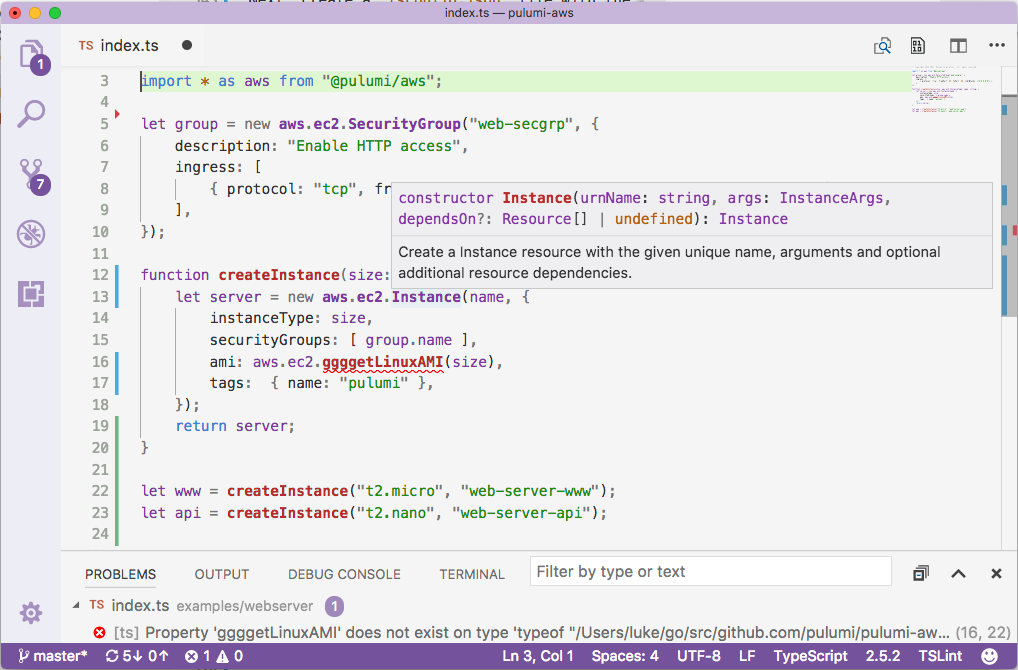
Tools like VS Code will give you completion lists, live error reporting and inline documentation help.
Disabling built in TypeScript support
When using the built in TypeScript support, Pulumi sets the following compiler settings, which may not be overridden:
- target: “es6”,
- module: “commonjs”,
- moduleResolution: “node”,
- sourceMap: “true”,
If you need to change any of these settings, you can disable the built in TypeScript support by changing your the runtime setting in Pulumi.yaml to look like the following:
runtime:
  name: nodejs
  options:
    typescript: false